Building a blog with Elixir and Phoenix
TL;DR: it’s an Elixir app using Phoenix server side rendered pages, with the blog post pages generated from Markdown using NimblePublisher. It’s running on a self-hosted Dokploy instance running on Hetzner, with bunny.net as a CDN sitting in front of it.
This is a very belated write up of how this blog was put together! There's nothing terribly original here, but I figure it could come in handy for someone out there as a reference. And the world needs more Elixir content.
Why Phoenix
I have used static site generators before to power my blog (shoutout to Hakyll), but I wanted to open the door for myself to also have little experiments on this site, ones that would require more interactivity than a static site allows. Besides, I just like using Phoenix. Although most of my Phoenix projects use LiveView, this felt like a good place to do things old-school with DeadViews.
It also means I get full control of what I’m building. Using a tool someone else created means getting a lot for free, but the moment you step outside of the expected you’re having to figure out how to make things work for their tool.
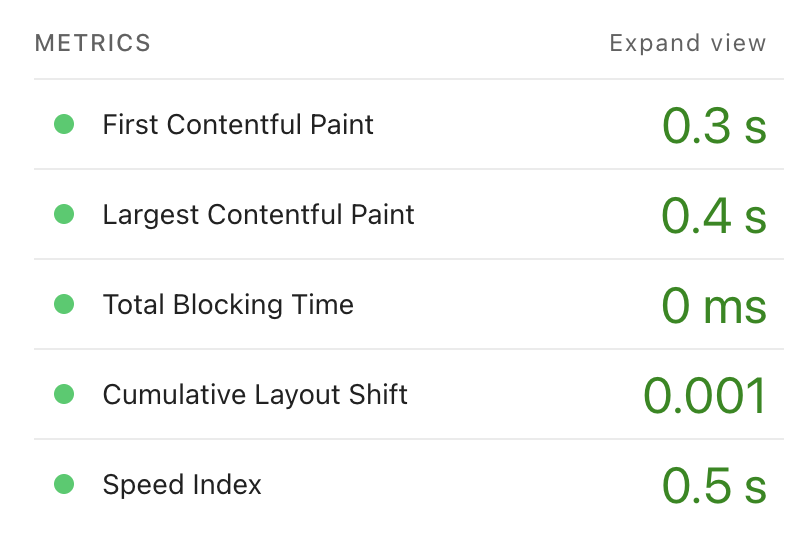
So I kept things simple. No Ecto, no DB. Just server-side rendered HTML. It’s blazingly fast, as you can see from this PageSpeed Insights report.
NimblePublisher
My setup closely matches the original Dashbit blog post Welcome to our blog: how it was made!, which led to the creation of NimblePublisher.
The heart of the blog is the NimblePublisher setup, which consists of a use block:
defmodule JolaDev.Blog do

  use NimblePublisher,
    build: JolaDev.Blog.Post,
    from: Application.app_dir(:jola_dev, "priv/posts/**/*.md"),
    as: :posts,
    html_converter: JolaDev.Blog.MarkdownConverter,
    highlighters: [:makeup_elixir]
...
This will load up all the posts, parse the frontmatter, run it through the markdown converter, and compile it into module attributes. This means there’s no work left to be done at runtime, it’s all pre-compiled.
Posts are organized by year: priv/posts/2025/08-18-ruthless-prioritization.md . We get beautiful code block syntax highlighting through Makeup. The Blog module also defines a set of helpers for fetching the posts:
@posts Enum.sort_by(@posts, & &1.date, {:desc, Date})

# Let's also get all tags
@tags @posts
      |> Enum.flat_map(& &1.tags)
      |> Enum.uniq()
      |> Enum.sort()

# And finally export them
def all_posts, do: @posts
def all_tags, do: @tags

def posts_by_tag(tag) do
  Enum.filter(all_posts(), fn post -> tag in post.tags end)
end

def find_by_id(id) do
  Enum.find(all_posts(), fn post -> post.id == id end)
end
The only thing that took a bit of figuring out for me was getting Tailwind classes into the outputted HTML. I’m pretty sure I’ve seen better approaches shared since I wrote this, but this works too. Under earmark_options, pass:
Earmark.Options.make_options!(
  registered_processors: [
    Earmark.TagSpecificProcessors.new([
      {"a", &Earmark.AstTools.merge_atts_in_node(&1, class: "underline")},
      {"h1", &Earmark.AstTools.merge_atts_in_node(&1, class: "text-3xl py-4")},
      {"h2", &Earmark.AstTools.merge_atts_in_node(&1, class: "text-2xl py-4")},
      {"h3", &Earmark.AstTools.merge_atts_in_node(&1, class: "text-xl py-4")},
      {"p", &Earmark.AstTools.merge_atts_in_node(&1, class: "text-md pb-4")},
      {"code", &Earmark.AstTools.merge_atts_in_node(&1, class: "")},
      {"pre",
       &Earmark.AstTools.merge_atts_in_node(&1,
         class: "mb-4 p-1 py-4 overflow-x-scroll border-y"
       )},
      {"ol", &Earmark.AstTools.merge_atts_in_node(&1, class: "list-decimal")},
      {"ul", &Earmark.AstTools.merge_atts_in_node(&1, class: "list-disc pb-4")},
      {"blockquote",
       &Earmark.AstTools.merge_atts_in_node(&1,
         class: "pl-4 border-l-2 mb-4 border-purple-700"
       )}
    ])
  ]
)
You probably have your own preferences for how to set up your classes, but this gives you a pattern you can use to ensure that the tags that come out have the appropriate classes.
The Frontend
As mentioned this is all server-side rendered Phoenix templates. It’s using standard Tailwind CSS. It predates DaisyUI and I don’t think there’s a strong reason for me to make the lift of getting it in, although I wouldn’t have minded it being a part of the scaffolding back when I set up the blog!
The only JS snippets in here are a mobile menu toggle and the Phoenix topbar. Apart from the Tailwind library, the custom CSS in here is pretty minimal. You get a lot out of the box with a Phoenix project.
And of course, dark mode. I know it’s not everyone’s cup of tea, but it is my website after all.
CI
I’ve got Github Actions set up to run on every push and PR, just the basic Elixir quality assurance tools.
mix compile --warnings-as-errorsmix format --check-formattedmix credo --strictmix test
And then I’ve got Dependabot set up as well. I’ve been hearing and thinking a lot about how it creates a lot of noise, but I feel like that’s less of an issue in the Elixir community. Packages tend to not have a lot of dependencies, and so you don’t get the same waves of bumps going out that npm does. And merging them is satisfying.
Deployment
On the hosting side things get a bit more spicy. The repo includes a multi-stage Docker file, roughly based on the Phoenix recommended example file. This means that most of the dependencies are only pulled in at build time, and the image you get out on the other side is a bit smaller. I’m using Elixir 1.18.4, Erlang 28.0.2, and Debian trixie-20250721-slim at the time of writing this, but that’s likely to change. There’s something very satisfying about bumping dependencies.
And now we're arriving at Dokploy, an open source platform as a service (PaaS) for running apps, basically a self-hosted Heroku. It does everything, automatic builds and deploys from Github updates, built-in Docker Swarm, networking, orchestration of replicas across the cluster, rolling deploys, rollbacks, preview builds, and much more.
So my publish flow is basically: create a PR and wait for CI to finish (I could skip this but it’s nice to know I didn’t mess something up). When I merge the PR Dokploy automatically picks that up and triggers a checkout and build of the repo. Once that finishes, it starts a rolling deploy to replace the running replicas. And we’re live. With cached layers on the server, deploys can finish in 30s, zero effort.
I run this Dokploy instance on Hetzner and my experience has been really positive. The pricing is unbeatable, even with the recent increase, and it’s been rock solid for me. Really, with the Dokploy instance, there’s nothing stopping me from packing up and going somewhere else. Having that kind of freedom is very nice. But I’m more than happy to stick with Hetzner.
The Little Things
I’ve set up a few little conveniences for my app so I’ll share some example code for them here.
RSS
RSS is managed by a plain Phoenix controller that looks something like this:
defmodule JolaDevWeb.RssXML do
  use JolaDevWeb, :html

  embed_templates "rss_xml/*"

  def format_rfc822(%Date{} = date) do
    date
    |> DateTime.new!(~T[00:00:00], "Etc/UTC")
    |> format_rfc822()
  end

  def format_rfc822(%DateTime{} = datetime) do
    Calendar.strftime(datetime, "%a, %d %b %Y %H:%M:%S +0000")
  end
end
and the corresponding XML:
<?xml version="1.0" encoding="UTF-8"?>
<rss version="2.0" xmlns:atom="http://www.w3.org/2005/Atom" xmlns:content="http://purl.org/rss/1.0/modules/content/">
  <channel>
    <title>jola.dev</title>
    <link><%= url(~p"/") %></link>
    <description>Blog posts from jola.dev</description>
    <language>en-us</language>
    <lastBuildDate><%= JolaDevWeb.RssXML.format_rfc822(DateTime.utc_now()) %></lastBuildDate>
    <atom:link href="<%= url(~p"/rss.xml") %>" rel="self" type="application/rss+xml" />

    <%= for post <- @posts do %>
    <item>
      <title><%= post.title %></title>
      <link><%= url(~p"/posts/#{post.id}") %></link>
      <description><![CDATA[<%= post.description %>]]></description>
      <content:encoded><![CDATA[<%= post.body %>]]></content:encoded>
      <pubDate><%= JolaDevWeb.RssXML.format_rfc822(post.date) %></pubDate>
      <guid isPermaLink="true"><%= url(~p"/posts/#{post.id}") %></guid>
      <author><%= post.author %></author>
    </item>
    <% end %>
  </channel>
</rss>
Sitemap
I was a bit surprised not to find a clean little library for generating the sitemap (this may have changed since I wrote the code!), but I guess the implementation is just going to heavily depend on your setup. Anyway, just sharing this for reference.
defmodule JolaDevWeb.SitemapController do
  use JolaDevWeb, :controller

  def index(conn, _params) do
    sitemap = JolaDev.Sitemap.generate()

    conn
    |> put_resp_content_type("text/xml")
    |> send_resp(200, sitemap)
  end
end

defmodule JolaDev.Sitemap do
  alias JolaDev.Blog

  @host "https://jola.dev"

  def generate do
    """
    <?xml version="1.0" encoding="UTF-8"?>
    <urlset xmlns="http://www.sitemaps.org/schemas/sitemap/0.9">
    #{generate_static_pages()}#{generate_tag_pages()}#{generate_blog_posts()}
    </urlset>
    """
  end

  defp generate_static_pages do
    pages = [
      %{loc: @host, changefreq: "monthly", priority: "1.0"},
      %{loc: "#{@host}/about", changefreq: "monthly", priority: "0.8"},
      %{loc: "#{@host}/projects", changefreq: "weekly", priority: "0.9"},
      %{loc: "#{@host}/talks", changefreq: "monthly", priority: "0.7"},
      %{loc: "#{@host}/posts", changefreq: "weekly", priority: "0.9"}
    ]

    Enum.map_join(pages, "\n", &url_entry/1)
  end

  defp generate_tag_pages do
    Blog.all_tags()
    |> Enum.map(fn tag ->
      %{loc: "#{@host}/posts/tag/#{tag}", changefreq: "weekly", priority: "0.6"}
    end)
    |> Enum.map_join("\n", &url_entry/1)
  end

  defp generate_blog_posts do
    Blog.all_posts()
    |> Enum.map(fn post ->
      %{
        loc: "#{@host}/posts/#{post.id}",
        lastmod: Date.to_iso8601(post.date),
        changefreq: "monthly",
        priority: "0.8"
      }
    end)
    |> Enum.map_join("\n", &url_entry/1)
  end

  defp url_entry(params) do
    """
      <url>
        <loc>#{params.loc}</loc>
        #{if params[:lastmod], do: "<lastmod>#{params.lastmod}</lastmod>", else: ""}
        <changefreq>#{params.changefreq}</changefreq>
        <priority>#{params.priority}</priority>
      </url>
    """
  end
end
Blog redirect plug
When I first moved over to this new app I wanted to ensure that I kept my old blog post links alive, so I set up this little plug to rewrite requests to match the new layout.
defmodule JolaDevWeb.Plugs.BlogRedirect do
  import Plug.Conn

  def init(_), do: []

  def call(conn, _opts) do
    if conn.host == "blog.jola.dev" do
      ids = JolaDev.Blog.ids()
      path = strip_path(conn.request_path)

      path =
        if path in ids do
          "posts/" <> path
        else
          path
        end

      conn
      |> put_resp_header("location", "https://jola.dev/" <> path)
      |> send_resp(:moved_permanently, "")
      |> halt()
    else
      conn
    end
  end

  defp strip_path("/" <> path), do: path
  defp strip_path(path), do: path
end
SEO
I went a bit further on this one. Each page has its own meta description, Open Graph tags, and Twitter Card tags — all driven by assigns passed from the controllers. Blog posts automatically get og:type="article" with article:published_time and article:tag set from the post metadata. The layout just reads from conn.assigns with sensible fallbacks, so adding SEO to a new page is just a matter of passing the right assigns. Here's what the blog-post-specific bits look like in the layout:
<meta property="og:type" content={if(@conn.assigns[:post], do: "article", else: "website")} />
<%= if post = @conn.assigns[:post] do %>
  <meta property="article:published_time" content={Date.to_iso8601(post.date)} />
  <meta property="article:author" content="https://jola.dev/about" />
  <%= for tag <- post.tags do %>
    <meta property="article:tag" content={tag} />
  <% end %>
<% end %>
Same idea for the Twitter Card and description tags — one place in the layout, driven entirely by what the controller passes in.
I also added llms.txt and llms-full.txt endpoints, this is a newer standard that helps AI systems understand your site. It follows the same pattern as the sitemap: a module that generates the content from Blog.all_posts(), and a controller that serves it as plain text. Whether it actually matters yet, who knows, but it was trivial to add and I figure it can't hurt.
Wrapping Up
This app is intentionally kept simple but powerful. Everything is set up the way I want it and I have a zero effort and very fast pipeline for publishing new posts. If you're an Elixir dev thinking about a personal site, consider just using Phoenix. Combined with NimblePublisher you’ve got a really powerful and blazing fast blog framework right there.
And while you’re at it, why not host it on Hetzner! If you use the referral link to sign up you get €20 and I get €10. If you prefer not to use the referral link, here’s a plain link: https://www.hetzner.com/cloud/. Also consider joining me in sponsoring Dokploy.
Source code is available at: https://github.com/joladev/jola.dev. Next up I’ll talk about setting up bunny.net and a separate post on Dokploy on Hetzner.
Written by Johanna Larsson. Thoughts on this post? Find me on Bluesky at @jola.dev .
Related posts
AI is antithetical to learning
LLM agents can write a lot of code for you very fast, but they also take away opportunities to learn and grow.
Migrating your Bluesky account the hard way
I used the goat command line tool to migrate my main Bluesky account to a new server and survived to tell the tale.
Cluster singleton pattern
You can register a process name globally in Elixir and OTP will ensure it's unique, but there are some surprising edge cases. This shows a pattern for safely defining cluster singletons.